
Images & PDF · Step-by-step guide
How to Draw and Sketch Online for Free
Drawing Pad is a simple full-screen canvas for sketching ideas, doodling, marking up diagrams or letting kids draw. It works with a mouse, trackpad, finger or stylus.
How to use it
Open the pad and pick a tool
Press Open drawing pad. Choose Brush to draw freehand, or pick Eraser, Line, Rectangle, Ellipse, Triangle, Arrow or Text.
Choose a colour and size
Tap a colour swatch and adjust the size and opacity.
Draw on the canvas
Draw with your mouse or finger. Use undo and redo if you make a mistake, and Select to move shapes.
Download
Press Download to save your drawing as a PNG. Switch on White bg on download if you want a white background instead of a transparent one.
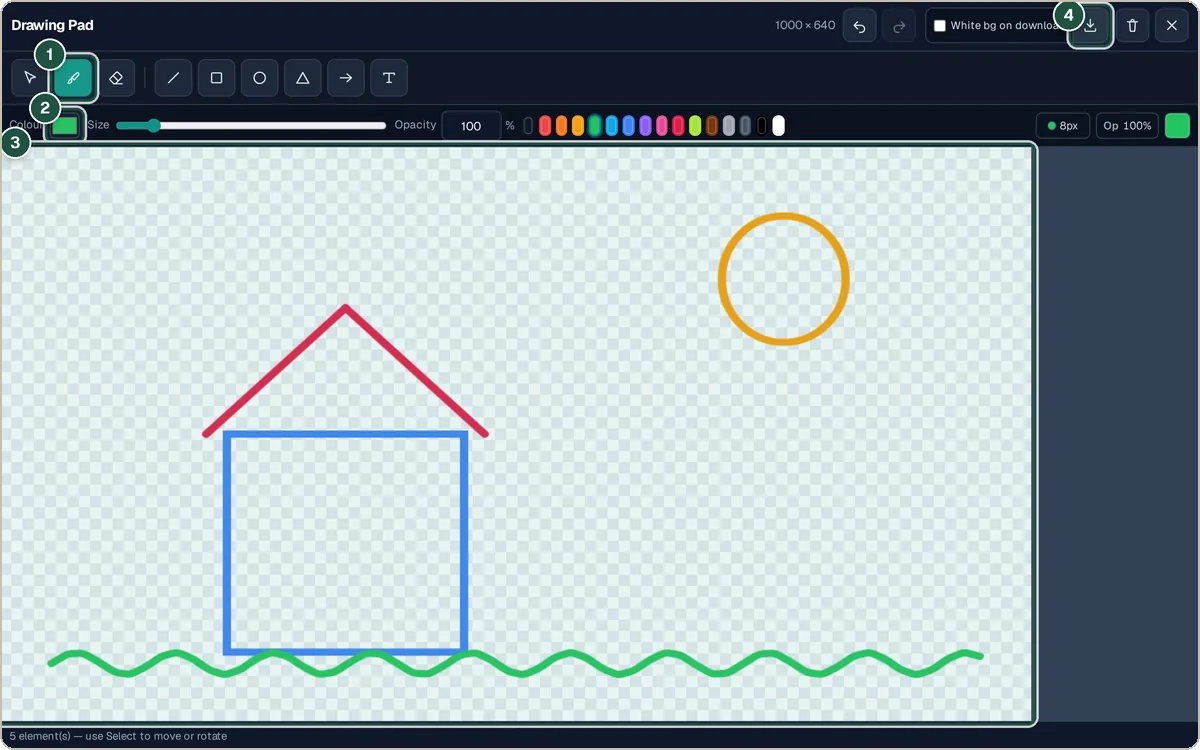
Brush (1), colour (2), the canvas (3) and Download (4).
Tips and common questions
Does it work on a phone or tablet?
Yes. It is built for touch as well as mouse, and a stylus works too.
Can I get a transparent background?
Yes. Leave White bg on download switched off and the empty areas stay transparent.
Is my drawing saved?
No. Download it before you close the page.
Privacy
Your drawing stays on your device. Nothing is uploaded.
Ready to try it? The Drawing Pad — Draw, Paint & Sketch Online is free and needs no account.
Open the Drawing Pad — Draw, Paint & Sketch Online