
Everyday · Step-by-step guide
How to Create a Transparent Signature Online
Signature Maker creates a clean image of your signature that you can drop into PDFs, Word documents and emails. Draw it with a mouse or finger, or type your name in a handwriting style.
How to use it
Choose Draw It or Type It
Pick Draw It to sign with your mouse, trackpad or finger, or Type It to use a font.
Enter your name
In Type It mode, type your name into Your name.
Pick a style
Choose a Signature style such as Brush Script or Handwriting, and set the Ink colour. In Draw It mode you can change the Pen thickness.
Check the preview
Your signature appears on the pad. Press Clear to start again.
Download
Press Download Transparent PNG so it sits cleanly on any document, or Download with White Background.
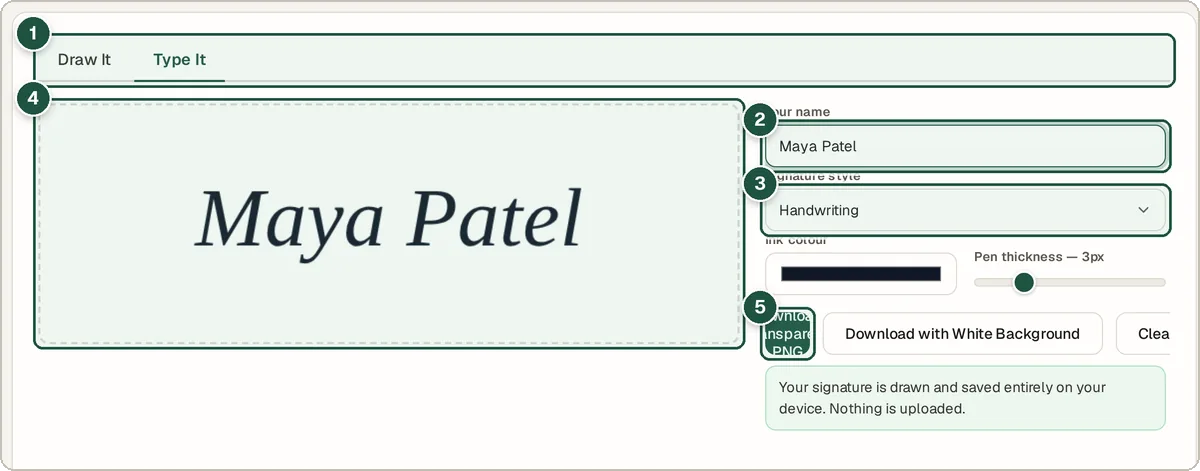
Draw/Type tabs (1), your name (2), style (3), preview (4) and Download Transparent PNG (5).
Tips and common questions
Is a typed signature legally valid?
In many countries an electronic signature can be valid for everyday agreements, but the rules vary. For important contracts, check what the other party accepts.
How do I add it to a PDF?
Download the transparent PNG, then open the PDF Editor, choose Edit content, open your PDF and use the Image tool to place it where you need it.
Why a transparent background?
A transparent PNG has no white box around it, so it looks natural on coloured paper or over a signature line.
Privacy
Your signature is created in your browser and never leaves your device.
Ready to try it? The Signature Maker is free and needs no account.
Open the Signature Maker