
Text & Writing · Step-by-step guide
How to Generate Lorem Ipsum Placeholder Text
Lorem Ipsum Generator makes placeholder text for designs, mockups and website layouts, so you can see how a page looks before the real words are ready.
How to use it
Choose how much text
Type a number into Count, for example 3.
Choose the unit
Pick Paragraphs, Sentences or Words from Unit. Leave Start with "Lorem ipsum..." ticked if you want the classic opening.
Press Generate
Your placeholder text appears in the box below.
Copy it
Press Copy and paste the text into your design tool, website builder or document.
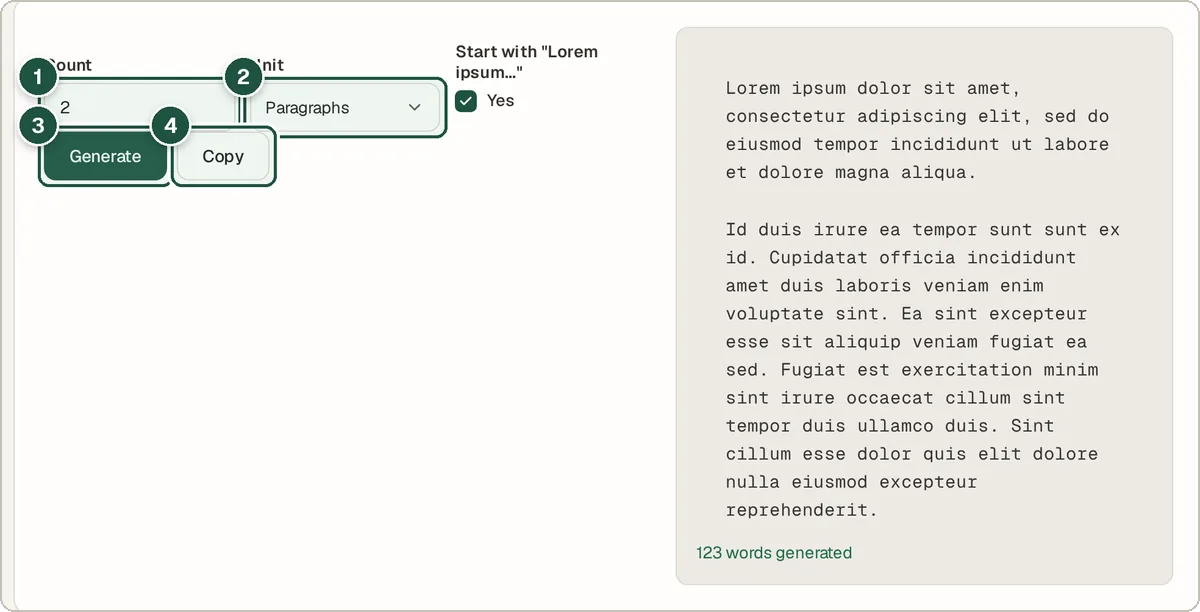
Count (1), unit (2), the Generate button (3) and Copy (4).
Tips and common questions
What is lorem ipsum?
It is scrambled Latin text that has been used by printers and designers since the 1500s. It looks like real writing, so people focus on the layout instead of reading the words.
Should I use lorem ipsum on a live website?
No. Replace it with real content before you publish. Placeholder text can confuse visitors and hurt your search ranking.
How many words are in a paragraph?
Generated paragraphs are a few sentences long, a similar size to a typical paragraph on a web page.
Privacy
The text is generated in your browser. Nothing is sent to a server.
Ready to try it? The Lorem Ipsum Generator is free and needs no account.
Open the Lorem Ipsum Generator