
Text & Writing · Step-by-step guide
How to Count Words and Characters Online
Word Counter shows the length of your text as you type: words, characters, sentences, paragraphs and reading time. It is handy for essays, social posts, cover letters and anything with a word limit.
How to use it
Paste or type your text
Click the big text box and paste your writing, or start typing. There is no Count button to hunt for. The numbers update with every key you press.
Read your stats
The boxes below the text show words, characters, characters without spaces, sentences, paragraphs and lines, plus reading time, speaking time, unique words and average word and sentence length.
Set a goal if you have a limit
Type a number into Goal and choose Words or Characters. A progress bar fills as you write, so you can see how close you are to the limit.
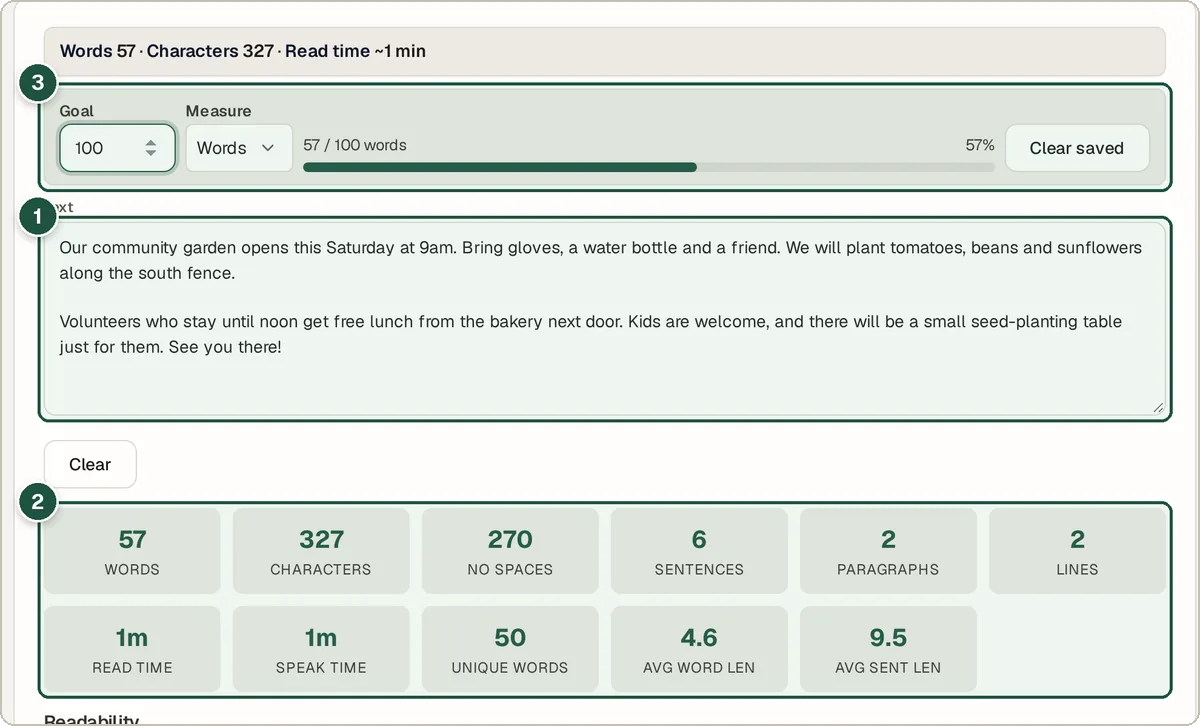
The text box (1), the live stats (2) and the writing goal (3).
Tips and common questions
Does it save my text?
Your draft is saved in your own browser as you type, so it is still there if you close the tab by mistake. Use Restore draft to bring it back or Clear saved to delete it. Nothing is sent to a server.
How is reading time worked out?
It divides your word count by an average reading speed. Treat it as a rough guide, because real people read at different speeds. Speaking time works the same way, using a slower speaking pace.
Do spaces count as characters?
The tool shows both numbers. Many sites, such as X (Twitter), count spaces, while some forms only count letters. Use whichever your limit asks for.
Can I count words in a Word or PDF file?
Copy the text out of the document and paste it into the box. For a PDF, you can pull the text out first with the PDF to Word converter.
Privacy
Your text is counted inside your browser. It is never uploaded, and the saved draft lives only on your device.
Ready to try it? The Word & Character Counter is free and needs no account.
Open the Word & Character Counter