
Text & Writing · Step-by-step guide
How to Write and Preview Markdown Online
Markdown Preview is a two-pane editor. You write simple Markdown on the left and see the formatted page on the right. It is great for README files, notes, docs and blog drafts.
How to use it
Write in the editor
Type Markdown into the Markdown box. For example,
# Titlemakes a heading and**bold**makes bold text.Watch the preview
The Rendered Preview updates as you type, showing headings, lists, tables, links and code blocks as they will look.
Use the toolbar if you forget the syntax
Buttons for bold, italic, heading, link, image, code, list, quote, table and task list insert the right Markdown for you.
Copy or download
Press Copy Markdown, or use Download .md, Copy HTML or Download HTML to take your work elsewhere.
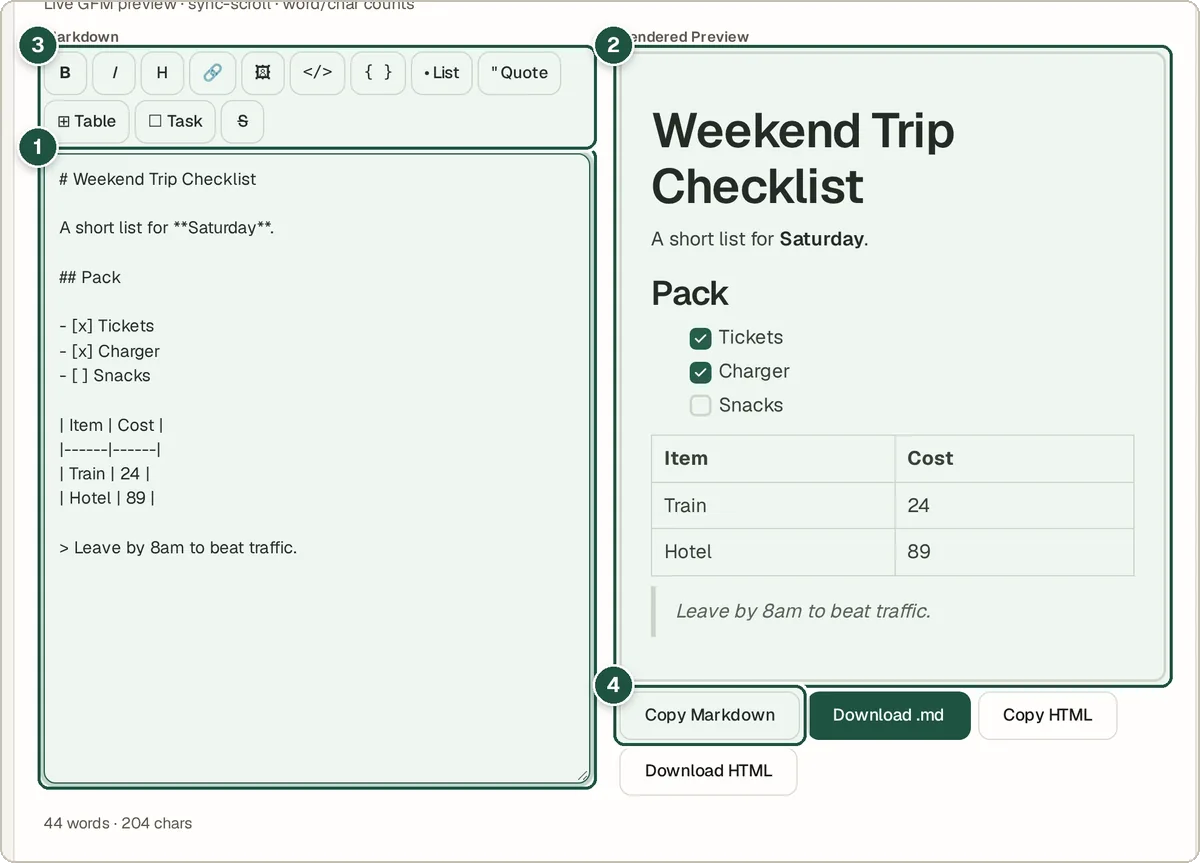
The editor (1), live preview (2), formatting toolbar (3) and Copy Markdown button (4).
Tips and common questions
What is Markdown?
Markdown is a simple way to format text using ordinary characters, such as # for headings and - for bullet points. GitHub, Reddit, Notion and many other apps use it.
Does it support GitHub-style tables and task lists?
Yes. It supports GitHub Flavored Markdown, including tables, task lists (- [ ]), strikethrough and automatic links.
Can I get HTML out of it?
Yes. Use Copy HTML or Download HTML to get the rendered page as HTML code.
Privacy
Your writing stays in your browser. The preview is created on your device and nothing is uploaded.
Ready to try it? The Markdown Preview is free and needs no account.
Open the Markdown Preview