
Developer · Step-by-step guide
How to Encode and Decode HTML Entities
HTML Encoder / Decoder turns special characters like <, > and & into HTML entities so they show as text on a web page instead of being treated as code, and turns entities back into normal text.
How to use it
Paste your text
Paste it into Enter text to encode or decode.
Choose content or attribute
Pick Encode for Content for text between tags, or Encode for Attribute for text inside an attribute like
title="…".Press a button
Press Encode HTML, or Decode HTML Entities to go back. There are also Escape for JS String and CSS Selector Escape.
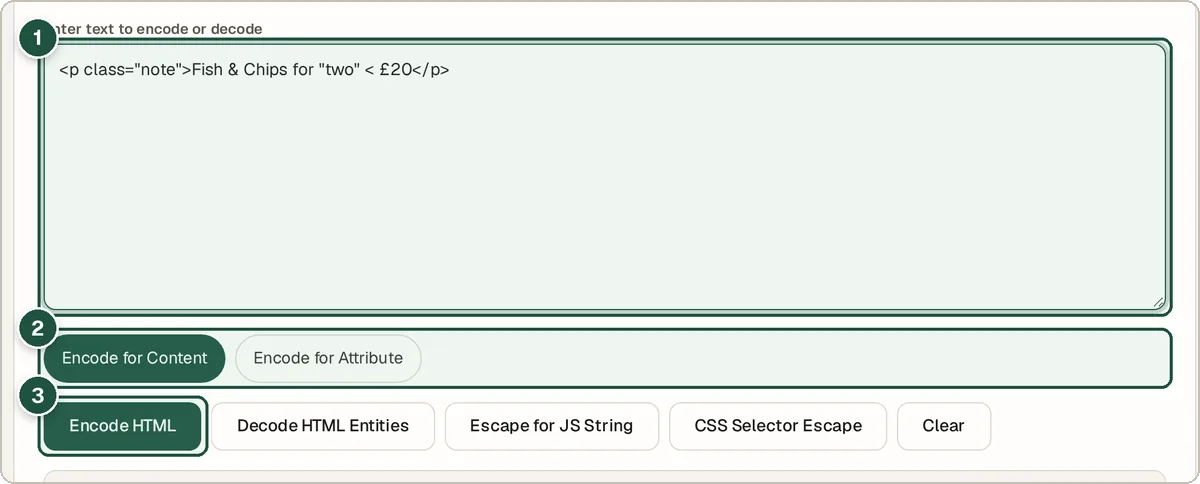
Your text (1), content or attribute (2) and Encode HTML (3). Copy the result
The result appears below with a character count.
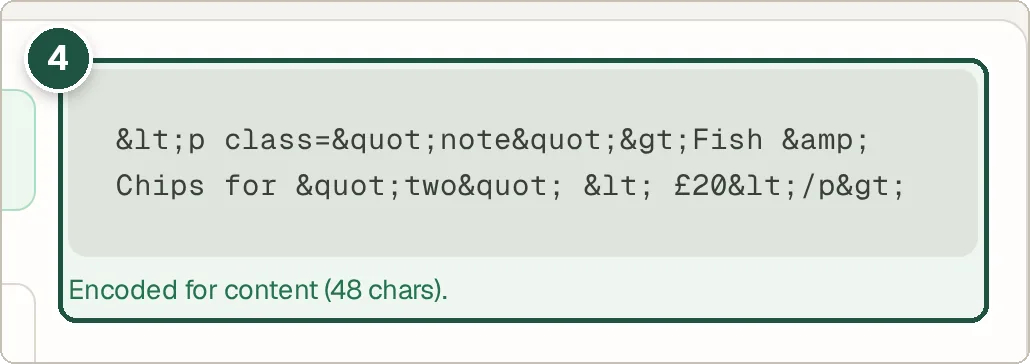
The encoded result (4).
Tips and common questions
Why encode HTML?
If you paste <b> into a page, the browser treats it as code. Encoding shows it as text and also helps block code injection (XSS) when showing user input.
Where can I look up an entity?
Open HTML Entity Reference at the bottom of the tool to browse all 252 named entities.
What is the difference from URL encoding?
HTML encoding is for text on a web page. URL encoding is for text inside a web address. Use the URL Encoder for links.
Privacy
Your data is processed inside your browser and is never uploaded, so it is safe to paste private or work data.
Ready to try it? The HTML Encoder / Decoder is free and needs no account.
Open the HTML Encoder / Decoder