Desert fort at blue hour
Text to imageCinematic16:9Wivrix AI, ChatGPT, or Gemini
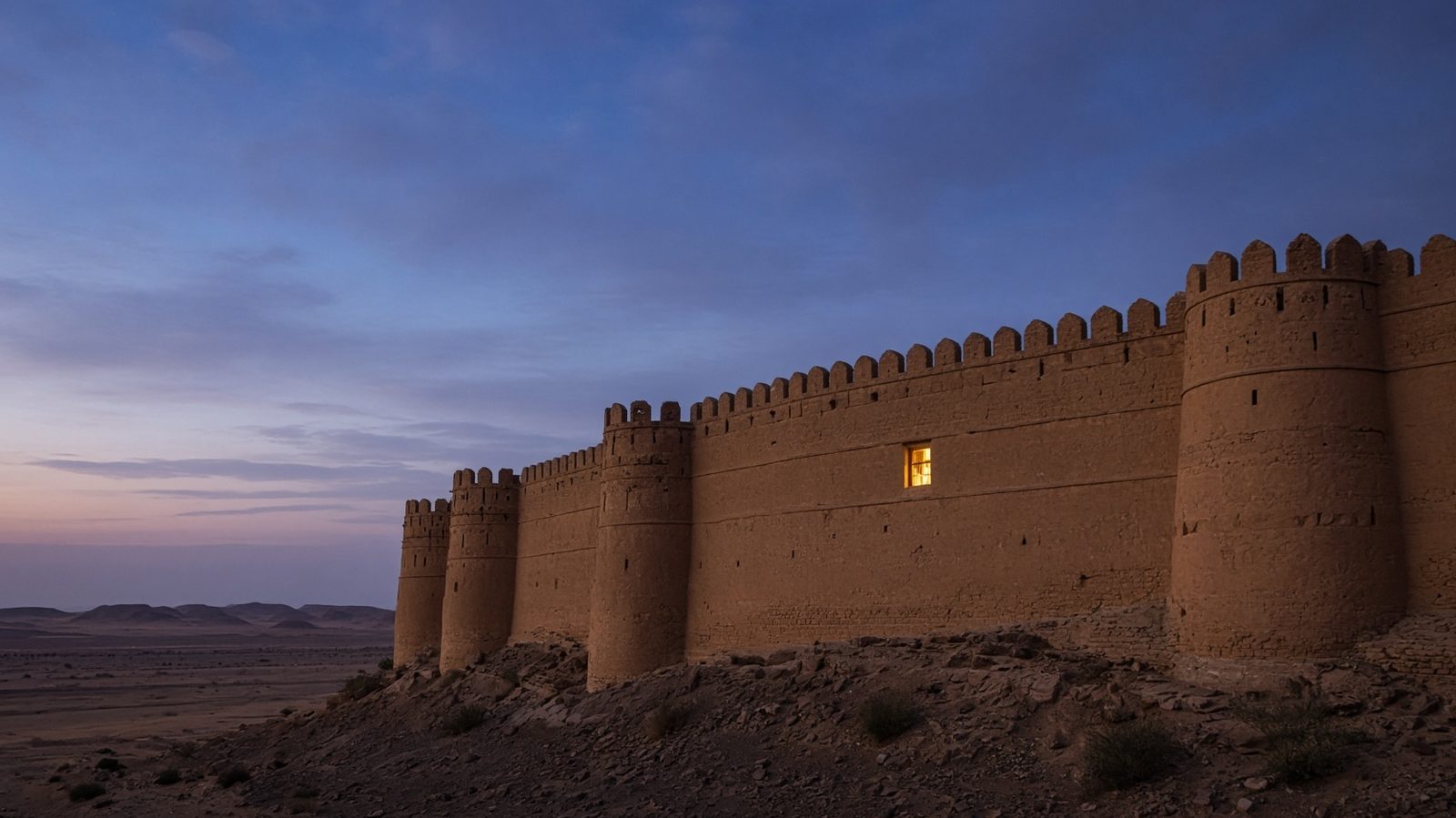
A sandstone fort wall in a desert landscape at blue hour, one small warm window lit, in a wide cinematic frame, with no flags or text.
Prompt
A generic desert fort wall and a modest bastion, original architecture not copied from Jaisalmer, Mehrangarh or any named fort: sandstone, a few tiny windows, one of them lit, a dry plain or dune, a sliver of a path, no people, no flags, no typography. Key: deep blue-hour skylight, 10000 K, even on the stone. The single window is 2400 K tungsten, small and sharp. A last magenta lip on the horizon allowed. Canon EOS R5 with an RF 70–200mm at 85mm, slightly low, 80 m, f/5.6, 1/60 s, ISO 200, tripod-still look. Grade: Sandstone honey against Prussian and violet blue; the window a butter gold. Aspect 16:9. No watermark, logo, extra people, children or brand marks.
Full prompt
{
  "project_name": "Desert fort at blue hour",
  "category": "cinematic",
  "prompt_type": "text-to-image",
  "task_objective": "Create a premium 16:9 blue-hour landscape of an original desert fort — not a copy of a named monument — with one warm window and a vast cool desert.",
  "required_user_inputs": {
    "mandatory": [],
    "identity_source": null,
    "notes": "No user photo is required. Generate the entire frame from this specification."
  },
  "art_style": {
    "medium": "Photoreal cinematic landscape, full-frame 35 mm",
    "aesthetic": "Epic but quiet, more painting than tourist vista",
    "lighting": "Key: deep blue-hour skylight, 10000 K, even on the stone. The single window is 2400 K tungsten, small and sharp. A last magenta lip on the horizon allowed. No floodlighting, no flags, no decorative festoon bulbs.",
    "camera": "Canon EOS R5 with an RF 70–200mm at 85mm, slightly low, 80 m, f/5.6, 1/60 s, ISO 200, tripod-still look",
    "colour_grade": "Sandstone honey against Prussian and violet blue; the window a butter gold; protect the sky; no heavy teal-orange.",
    "do_not_use": [
      "named-fort copies",
      "flags",
      "text",
      "tour buses",
      "people on the walls",
      "celebrity likeness",
      "brand logos",
      "children",
      "watermarks"
    ]
  },
  "colors_and_visual_details": {
    "palette": [
      {
        "name": "sky blue",
        "hex": "#1C2A48"
      },
      {
        "name": "horizon magenta",
        "hex": "#8A4A68"
      },
      {
        "name": "sandstone",
        "hex": "#C4A070"
      },
      {
        "name": "window",
        "hex": "#E0A04A"
      },
      {
        "name": "sand",
        "hex": "#C8A878"
      },
      {
        "name": "shadow",
        "hex": "#4A3A30"
      }
    ],
    "notes": "The lit window must be small and precious, not a blazing façade. Stone should feel mineral."
  },
  "composition_and_framing": {
    "canvas": "Widescreen 16:9 at 3840 x 2160 px, UHD frame.",
    "placement": "Fort in the right third; desert in the left; horizon at 35% from the bottom; 8% margin.",
    "padding": "Keep a 6% safe margin on all sides; no important faces, hands, type or product edges cropped.",
    "camera_angle": "A low three-quarter of the fort wall rising from dunes or a rocky plain, horizon low, a huge blue sky, the lit window as a small punctum.",
    "foreground": "A sharp patch of sand or a thorn bush, slightly large in the lower left.",
    "midground": "The fort wall, the lit window, a fallen stone.",
    "background": "A vast blue-hour sky, maybe a first star, distant low hills, no towers of a famous skyline."
  },
  "output_specifications": {
    "format": "JPEG, high quality, natural grain, no compression artefacts.",
    "dimensions": "3840 x 2160 px",
    "aspect_ratio": "16:9",
    "platforms": [
      "Editorial widescreen",
      "film still",
      "desktop wallpaper"
    ],
    "resolution_intent": "Premium, print-capable sharpness with natural grain, not oversharpened social-media crunch."
  },
  "negative_prompt": [
    "watermark, logo, signature, username or UI chrome",
    "misspelt text or extra typography not specified",
    "children or anyone who appears under 18",
    "celebrity likeness, known actors, or references to existing films or memes",
    "brand logos, trademarks, or readable commercial packaging",
    "beauty-filter skin, plastic skin, poreless airbrushing",
    "extra fingers, warped hands, melted jewellery",
    "oversharpening, HDR halos, oversaturated 'Indian wedding' orange grade",
    "stock-photo poses and generic studio cyclorama unless specified",
    "low-resolution, muddy shadows, JPEG artefacts, vignette crushes"
  ],
  "scene_description": {
    "setting": {
      "value": "A generic desert fort wall and a modest bastion, original architecture not copied from Jaisalmer, Mehrangarh or any named fort: sandstone, a few tiny windows, one of them lit, a dry plain or dune, a sliver of a path, no people, no flags, no typography.",
      "importance": "critical"
    },
    "foreground": {
      "value": "A sharp patch of sand or a thorn bush, slightly large in the lower left.",
      "importance": "high"
    },
    "midground": {
      "value": "The fort wall, the lit window, a fallen stone.",
      "importance": "high"
    },
    "background": {
      "value": "A vast blue-hour sky, maybe a first star, distant low hills, no towers of a famous skyline.",
      "importance": "high"
    }
  },
  "exact_text": {
    "content": null,
    "text_preservation_rules": [
      "No typography, captions, logos, watermarks or typographic overlays unless a later field in this document specifies exact words."
    ]
  }
}
The full JSON is copied when you press Try or Copy prompt. Wivrix AI opens with a short summary, because the spec is longer than its 1,500-character field — paste the JSON into the box. ChatGPT and Gemini can take the full JSON.
Use this in ChatGPT or Gemini
- Copy the prompt — the full JSON spec.
- Open ChatGPT or Gemini and start a new image.
- Paste the JSON and generate. Add a size or aspect ratio if the tool asks for one.
Tip. If the first result is off, generate again or tighten the lighting and camera words.
Results vary by model, settings and (for photo edits) the photo you upload. Use pictures you have permission to edit. Do not create sexual or misleading images of real people.